👉🏻 myapp13프로젝트에서 user1@freelifemakers.com에서 user1@yourhost.domain.org를 팔로우 했습니다.
In the myapp13 project, user1@freelifemakers.com followed user1@yourhost.domain.org.
👉🏻 그리고 user1@yourhost.domain.org로 로그인해서 글을 쓸 경우user1@freelifemakers.com에 배달되고 pinafore.social에서도 확인 가능한지 테스트 했었습니다.
I also tested whether logging in as user1@yourhost.domain.org and posting a message would result in delivery to user1@freelifemakers.com and visibility on pinafore.social.
👉🏻 이번 myapp14프로젝트에서는 반대로 user1@yourhost.domain.org가 user1@freelifemakers.com을 팔로우 합니다.
In this myapp14 project, conversely, user1@yourhost.domain.org follows user1@freelifemakers.com.
👉🏻 그리고 user1@freelifemakers.com에서 글을 쓸 경우 user1@yourhost.domain.org로 글이 배달되는지 확인합니다.
Also, verify whether messages sent from user1@freelifemakers.com are delivered to user1@yourhost.domain.org.
📁 프로젝트 설치(myapp14) ,HTTPS설정
Project Installation (myapp14), HTTPS Configuration
✔️ nextjs프로젝트설치,sqlite설치,Caddy설치 및 설정
Next.js project setup, SQLite installation, and Caddy installation and configuration
📁 프로젝트 구조 / Project Structure
myapp14/
├── app/  (Next.js App Router)
│   ├── .well-known/webfinger/route.ts     -> webfinger
│   ├── api/posts/route.ts     -> 글 쓰기 API / Writing API
│   ├── api/follow/route.ts    -> 팔로우 API(임시) / Follow API(temporary)
│   ├── users/[username]/
│   │   ├── route.ts           -> Actor정보 / Acotr Information
│   │   ├── inbox/route.ts     -> Inbox
│   │   └── outbox/route.ts    -> outbox
│   ├── layout.tsx, page.tsx, globals.css
│   └── favicon.ico
├── lib/
│   ├── ap.ts                  -> Follow Accept
│   └── db.ts                  -> DB connection
├── data/
│   └── keys/                  -> private.pem, public.pem
├── data.sqlite                -> Database
├── Caddyfile                  -> https
└── package.json
📁 코드 작성 / Writing code
✔️sendFollow 함수 추가 / Add sendFollow function
— myapp14/lib/ap.ts
— 요청을 보낼때 그냥 fetch로보내면 gotosocial이 401 Unauthorized 에러를 발생 시킵니다.
If you send a request using just fetch, GoToSocial returns a 401 Unauthorized error.
— 그래서 private key로 사인해서 보냅니다.
So, it is signed with a private key and sent.
— sendFollow로 Follow 요청 보내기
Send a follow request using sendFollow.
export async function sendFollow(toInbox: string, targetActor: string, username: string) {
  const actorId = `https://${DOMAIN}/users/${username}`;
  const followId = `${actorId}/follows/${Date.now()}`;

  const followDoc = {
    '@context': 'https://www.w3.org/ns/activitystreams',
    id: followId,
    type: 'Follow',
    actor: actorId,
    object: targetActor
  };

  const body = JSON.stringify(followDoc);
  const url = new URL(toInbox);

  const digest = `SHA-256=${crypto.createHash('sha256').update(body).digest('base64')}`;
  const date = new Date().toUTCString();
  const signingString = `(request-target): post ${url.pathname}\nhost: ${url.host}\ndate: ${date}\ndigest: ${digest}`;

  const signer = crypto.createSign('sha256');
  signer.update(signingString);
  const signature = signer.sign(PRIVATE_KEY, 'base64');

  const keyId = `${actorId}#main-key`;
  const sigHeader = `keyId="${keyId}",headers="(request-target) host date digest",signature="${signature}"`;

  console.log(`➡️ [${username}] Follow 전송 / Follow sent -> ${toInbox} (${targetActor})`);

  const res = await fetch(toInbox, {
    method: 'POST',
    headers: {
      'Content-Type': 'application/activity+json',
      'Date': date,
      'Digest': digest,
      'Signature': sigHeader,
      'Host': url.host
    },
    body
  });

  const text = await res.text();
  console.log(`📬 Follow 결과 / Follow result: ${res.status}`, text);
  return { ok: res.ok, status: res.status, text, followDoc };
}
✔️ signedFetch 함수 추가
Add signedFetch function
— myapp14/lib/ap.ts
— 요청을 보낼때 그냥 fetch로보내면 gotosocial이 401 Unauthorized 에러를 발생 시킵니다.
If you send a request using just fetch, GoToSocial returns a 401 Unauthorized error.
— 그래서 private key로 사인해서 보냅니다.
So, it is signed with a private key and sent.
— signedFetch로 상대방 inbox 찾는 기능
Functionality to locate the recipient’s inbox using signedFetch
export async function signedFetch(urlStr: string, username: string) {
  const actorId = `https://${DOMAIN}/users/${username}`;
  const url = new URL(urlStr);
  const date = new Date().toUTCString();
  const signingString = `(request-target): get ${url.pathname}\nhost: ${url.host}\ndate: ${date}`;

  const signer = crypto.createSign('sha256');
  signer.update(signingString);
  const signature = signer.sign(PRIVATE_KEY, 'base64');

  const keyId = `${actorId}#main-key`;
  const sigHeader = `keyId="${keyId}",headers="(request-target) host date",signature="${signature}"`;

  console.log(`🔐 Signed GET -> ${urlStr}`);

  return fetch(urlStr, {
    headers: {
      'Accept': 'application/activity+json',
      'Date': date,
      'Signature': sigHeader,
      'Host': url.host
    }
  });
}
✔️ follow라우트 추가
Add follow route
— myapp14/app/api/follow/route.ts
// myapp14/app/api/follow/route.ts
import { sendFollow, signedFetch } from '@/lib/ap';

// myapp14 - Follow 보내기 API ✅
// POST /api/follow
export async function POST(req: Request) {
  try {
    const { username = 'user1', target } = await req.json();
    if (!target) return Response.json({ error: 'target 필요' }, { status: 400 });

    console.log(`➡️ 팔로우 시도 / Follow attempt: ${username} -> ${target}`);

    // 1. 상대방 inbox 찾기 - 서명된 GET으로! / Find the inbox with a signed GET request
    const actorRes = await signedFetch(target, username);

    if (!actorRes.ok) {
      const t = await actorRes.text();
      return Response.json({ error: `상대방 조회 실패 / Failed to look up the other party. ${actorRes.status}`, body: t }, { status: 400 });
    }

    const actor = await actorRes.json();
    const inbox = actor.inbox;
    console.log(`📬 inbox 찾음 / Found inbox: ${inbox}`);

    // 2. Follow 전송 / Send Follow
    const result = await sendFollow(inbox, target, username);

    return Response.json({
      ok: result.ok,
      inbox,
      target,
      result: result.text,
      follow: result.followDoc
    });

  } catch (e: any) {
    console.error('follow 에러 / Follow error:', e);
    return Response.json({ error: e.message }, { status: 500 });
  }
}
📁 내 서버에서 user1@freelifemakers.com를 팔로우하기
Follow user1@freelifemakers.com from my server
✔️ 팔로우 하기 위해서는 pinafore에 로그인해야하지만 아직 로그인 기능을 구현하지 않았습니다.
You need to log in to Pinafore to follow, but the login functionality hasn’t been implemented yet.
✔️ 그래서 터미널에서 curl 명령어로 내 로컬서버(yourhost.domain.org)에서 user1@freelifemakers.com를 팔로우합니다.
So, I use the curl command in the terminal to follow user1@freelifemakers.com from my local server (yourhost.domain.org).
✔️ /follow 라우트가 -d 파라메터의 정보로 팔로우를 시도합니다.
The /follow route attempts to follow using the information from the -d parameter.
# 내 터미널 / My Terminal

follow % curl -X POST https://aloy-horizon.duckdns.org/api/follow \
  -H "Content-Type: application/json" \
  -d '{
    "username": "user1",
    "target": "https://freelifemakers.com/users/user1"
  }'

{"ok":true,"inbox":"https://freelifemakers.com/users/user1/inbox","target":"https://freelifemakers.com/users/user1","result":"{\"status\":\"Accepted\"}","follow":{"@context":"https://www.w3.org/ns/activitystreams","id":"https://yourhost.domain.org/users/user1/follows/1786763495558","type":"Follow","actor":"https://yourhost.domain.org/users/user1","object":"https://freelifemakers.com/users/user1"}}
# nextjs 서버 로그 / nextjs server log (ok!)
➡️ [user1] Follow 전송 -> https://freelifemakers.com/users/user1/inbox (https://freelifemakers.com/users/user1)
📬 Follow 결과: 202 {"status":"Accepted"}📁 글 배달 확인 하기 / Check for delivered messages
✔️ 글이 내 서버로 배달되는지 확인하기위해서 pinafore.social에서 글을 써봅니다.
I am writing a post on pinafore.social to check if it gets delivered to my server.
✔️ 이때 로그인은 user1@freelifemakers.com 인경우 입니다.
In this case, the login account is user1@freelifemakers.com.
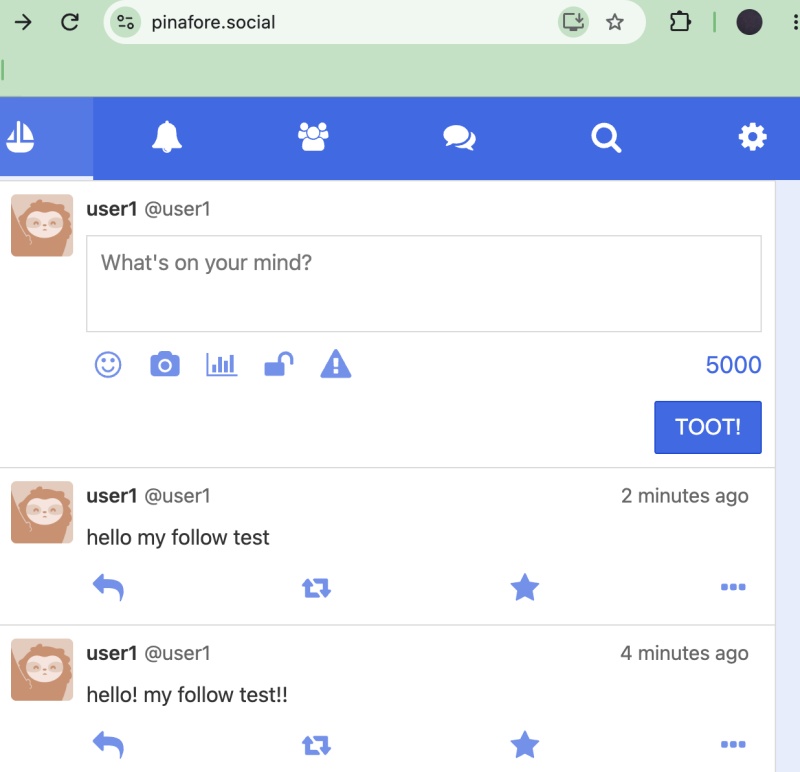
✔️ 글 배달확인하기(데이터베이스)
Check Message Delivery Status (Database)
sqlite> select content from posts;
Hello! my SNS!!
Hello! my SNS!!
[from: https://freelifemakers.com/users/user1] <p>hello! my follow test!!</p>
[from: https://freelifemakers.com/users/user1] <p>hello my follow test</p>
sqlite>
✔️ 서버 로그 / Server logs
📩 [user1] INBOX: Create https://freelifemakers.com/users/user1
📝 [user1] 새 글 도착 from https://freelifemakers.com/users/user1
내용: <p>hello! my follow test!!</p>
✅ [user1] 글 저장 완료!
 POST /users/user1/inbox 202 in 26ms (next.js: 15ms, application-code: 11ms)
📩 [user1] INBOX: Create https://freelifemakers.com/users/user1
📝 [user1] 새 글 도착 from https://freelifemakers.com/users/user1
내용: <p>hello my follow test</p>
✅ [user1] 글 저장 완료!
요한복음 8장 32절 / John 8:32
“그리고 너희는 진리를 알게 될 것이며, 진리가 너희를 자유롭게 할 것이다.”
“Then you will know the truth ,and the truth will set you free”


