👉🏻 리눅스를 이해하기 위해서 간단한 OS를 만드는 프로젝트를 시작합니다.
To understand Linux, I am starting a project to build a simple operating system.
👉🏻 OS개발을 위해서 사용되는 운영체제는 우분투 계열인 Xubuntu를 사용했습니다.
Xubuntu, a variant of Ubuntu, was used as the operating system for OS development.
👉🏻 CPU는 x86 cpu입니다.
The CPU is an x86 CPU.
👉🏻1.필수 도구 및 가상 머신 설치
Installing Essential Tools and Virtual Machines
✔️ 터미널을 열고 아래 명령어를 입력하여 컴파일러와 에뮬레이터를 설치합니다.
Open the terminal and enter the command below to install the compiler and emulator.
sudo apt update
sudo apt install nasm qemu-system-x86 build-essential gdb- nasm:
- — 어셈블리어 코드를 기계어로 번역해 주는 어셈블러입니다.
— It is an assembler that translates assembly language code into machine code. - qemu-system-x86:
- — 우리가 만든 OS 바이너리를 안전하게 실행해 볼 가상 머신(에뮬레이터)입니다.
— This is a virtual machine (emulator) where we can safely run the OS binary we created. - build-essential:
- — 나중에 C 언어 커널을 만들 때 필요한
gcc,make등의 컴파일 도구 모음입니다.
— This is a collection of compilation tools, such as gcc and make, that will be needed later when creating a C-language kernel.
👉🏻2.첫 번째 부트로더 코드 작성
Writing the first bootloader code
✔️ 원하는 디렉토리에 작업 폴더를 만들고, 텍스트 에디터(Mousepad, VS Code 등)로 boot.asm 파일을 생성합니다.
Create a working folder in your desired directory and create a boot.asm file using a text editor (such as Mousepad or VS Code).
mkdir ~/miniOS && cd ~/miniOS
nano boot.asm
✔️ 열린 파일에 아래의 16비트 x86 부팅 코드를 복사해서 붙여넣고 저장합니다.
Copy and paste the 16-bit x86 boot code below into the open file and save it.
; BIOS가 이 코드를 메모리 0x7C00에 로드합니다.
; The BIOS loads this code into memory at 0x7C00.
[org 0x7c00]

; 16비트 리얼 모드로 실행합니다.
; Executes in 16-bit real mode.
bits 16

start:
    ; BIOS의 '한 글자 출력' 기능을 선택합니다.
    ; Select the BIOS 'print single character' function.
    mov ah, 0x0e

    ; 화면에 찍을 문자 'X'
    ; Character 'X' to display on the screen
    mov al, 'X'

    ; BIOS 비디오 인터럽트를 호출하여 문자를 출력합니다.
    ; Calls the BIOS video interrupt to output a character.
    int 0x10

    ; 현재 위치($)에서 무한 루프를 돌며 대기합니다.
    ; Waits in an infinite loop at the current location ($).
    jmp $

; 512바이트 중 빈 공간을 모두 0으로 채웁니다.
; Fill all remaining space within the 512 bytes with zeros.
times 510 - ($ - $$) db 0

; 이 디스크가 부팅 가능하다는 것을 알리는 값을 저장.
; Stores a value indicating that this disk is bootable.
dw 0xaa55
👉🏻3.빌드 및 QEMU로 부팅 실행
Build and boot using QEMU
✔️ 터미널에서 아래의 두 줄을 실행하면 즉시 OS가 가상 머신에서 구동됩니다.
Running the two lines below in the terminal will immediately launch the OS on the virtual machine.
# 1. 어셈블리어 코드를 순수한 바이너리 파일(.bin)로 컴파일
# Compile assembly code into a pure binary file (.bin)
nasm -f bin boot.asm -o boot.bin

# 2. QEMU 에뮬레이터에 이 바이너리를 디스크로 넣어 가상 컴퓨터 부팅
# Put this binary on a disk and boot the virtual machine in the QEMU emulator
qemu-system-x86_64 -drive format=raw,file=boot.bin
✔️ 실행화면 / Execution Screen
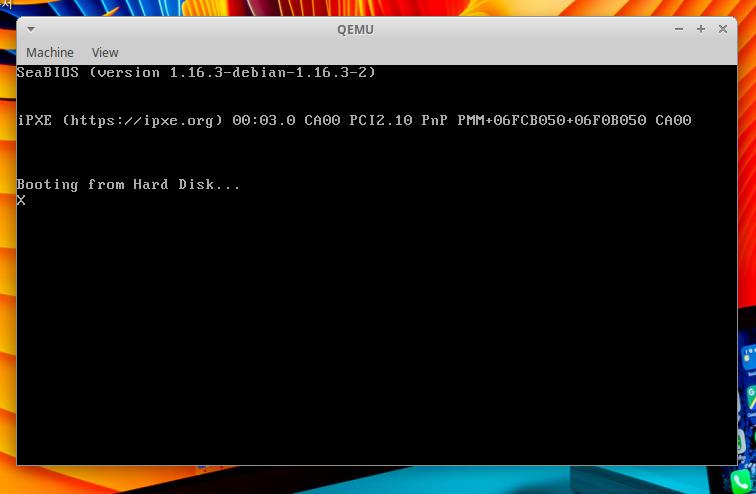
👉🏻3.종료하기 / Exit
— 새로 만든 운영체제가 실행되면 QEMU가 마우스 제어권을 독점해서 마우스가 작동 안될 수 있습니다.(정상동작)
When the newly created operating system runs, QEMU may capture exclusive control of the mouse, causing it to stop working (this is normal behavior).
— 이런 경우 키보드에서 아래키를 실행하면 프로그램을 종료 할 수 있습니다.
In this case, you can exit the program by pressing the Down arrow key on your keyboard.
Ctrl+Alt+G👉🏻 코드설명 / Code Explanation
✔️ [org 0x7c00]
— [org 0x7c00]에서 [ ]의 의미와 org 뜻
1)org (Origin)는 시작점이라는 뜻으로 메모리(RAM)에 배치될 프로그램의 주소위치를 컴파일러(nasm)에게 알려주는 지시어입니다.org (Origin) signifies a starting point; it is a directive that informs the compiler (nasm) of the memory address where the program is to be placed.
2)NASM(Netwide Assembler)에서는[org 0x7c00]를 org 0x7c00 이렇게 써도 됩니다.
In NASM (Netwide Assembler), you can write [org 0x7c00] simply as org 0x7c00.
3)0x7c00는 부팅전용 주소입니다.1981년 IBM이 최초의 개인용 컴퓨터(IBM PC 5150)를 만들 때 개발자들이 “부팅 전용 코드는 무조건 RAM의 0x7C00 주소에 올려놓고 실행하자”고 규칙을 정했습니다.
0x7c00 is a boot-specific address. When IBM created its first personal computer (the IBM PC 5150) in 1981, developers established a rule to always load and execute boot-specific code at the 0x7C00 address in RAM.
4)BIOS는 디스크(SSD, HDD, USB 등)의 맨 첫 번째 섹터(512바이트)를 읽어서 방금 말한 RAM의 0x7C00 주소로 복사합니다.(여기서는 QEMU안의 BIOS를 의미합니다.)
The BIOS reads the very first sector (512 bytes) of a disk (such as an SSD, HDD, or USB drive) and copies it to address 0x7C00 in RAM (referring here to the BIOS within QEMU).
✔️ bits 16
— 처음에는 무조건 16비트 모드를 사용하며 C언어를 사용하기 위해서는 bits 32로 32비트 모드전환을 해야합니다.
You start in 16-bit mode by default, and to use C, you must switch to 32-bit mode using the bits 32 directive.
✔️ start:
— 라벨입니다. begin:이나 main:등으로 다른 이름으로 정할 수 있습니다.
This is a label. You can assign it a different name, such as begin: or main:.
— 코드가 길어지고 반복,조건,점프를 위해서 사용됩니다.
It is used when code becomes lengthy and requires loops, conditional statements, and jumps.
✔️ mov ah, 0x0e
— mov ah, 0x0e는 AH 레지스터에 0x0e라는 값을 넣는(대입하는) 명령어입니다.mov ah, 0x0e is an instruction that loads (assigns) the value 0x0e into the AH register.
— AH는 16비트 CPU에서 사용하는 AX 레지스터의 상위 8비트 부분입니다.
— AX = [AH : AL] (상위 8비트 AH, 하위 8비트 AL) –> 16비트
AH is the upper 8-bit portion of the AX register used in 16-bit CPUs.
— AH는 CPU 명령어에 따라 특정 기능을 수행할 때, 기능 번호 혹은 상태 값을 저장하는 용도로 많이 쓰입니다.
AH is frequently used to store function numbers or status values when performing specific functions based on CPU instructions.
— mov ah, 0x0e(10진수로 14번)는 BIOS 비디오 인터럽트의 문자 출력 기능을 선택하는 코드입니다.mov ah, 0x0e (decimal 14) is the code that selects the character output function of the BIOS video interrupt.
— 즉, AH = 0x0e는 BIOS 비디오 서비스 중에서 문자 출력 기능을 지정하는 코드입니다.
In other words, AH = 0x0e is the code that specifies the character output function within the BIOS video services.
— 이후 AL 레지스터에 출력할 문자를 담고, int 0x10을 호출하면 커서 위치에 그 문자가 화면에 출력됩니다.
Afterward, if you place the character to be displayed into the AL register and call int 0x10, that character is displayed on the screen at the cursor’s position.
✔️ mov al, ‘X’
— AL 레지스터에 문자 ‘X’를 1바이트 크기로 저장합니다.
Store the character ‘X’ in the AL register as a 1-byte value.
— ‘X’의 ASCII 코드(16진수 0x58)를 AL에 저장하여 이후 명령어에서 이 값을 사용할 수 있게 합니다.
Store the ASCII code for ‘X’ (hexadecimal 0x58) in AL so that this value can be used in subsequent instructions.
✔️ int 0x10
— int인터럽트를 의미합니다.
It refers to the ‘int’ interrupt.
— 컴퓨터에서 인터럽트는 프로그램의 흐름을 잠시 멈추고, 특정한 하드웨어나 소프트웨어가 미리 정해진 처리를 할 수 있도록 하는 메커니즘입니다.
In computing, an interrupt is a mechanism that temporarily pauses the flow of a program, allowing specific hardware or software to perform a predefined task.
— 실제로 비디오 서비스를 호출해서 실제로 ‘X’라는 문자를 화면에 표시합니다.
It actually calls the video service and displays the character ‘X’ on the screen.
— 인터럽트 0x10는 다음과 같은 기능을 담당합니다.
Interrupt 0x10 handles the following functions.
화면 모드 설정 (텍스트/그래픽 모드 전환)
Screen Mode Setting (Switching between Text and Graphics Modes)

문자 또는 그래픽 출력
Text or graphic output

화면 클리어, 커서 위치 조절
Clear screen, adjust cursor position

폰트 설정, 팔레트 조정 등
Font settings, palette adjustments, etc.
⭐️ mov ah, mov al, int 는 하나의 로직으로 이해하면됩니다.
You can understand mov ah, mov al, and int as a single piece of logic.
✔️ jmp $
— $는 어셈블리어에서 현재 명령어 주소 또는 현재 위치(주소 레이블)를 나타내는 기호입니다.
In assembly language, $ is a symbol representing the current instruction address or the current location (address label).
— jmp $는 프로그램이 종료되지 않고 특정 위치에서 무한히 머무르면서 기다리도록 만드는 용도로 쓰입니다.jmp $ is used to make the program wait by remaining indefinitely at a specific location instead of terminating.
✔️ times 510 – ($ – $$) db 0
— 계산된 횟수만큼 바이트(db) 공간을 전부 0으로 채우라는 명령어입니다.
This command fills the specified number of bytes (db) with zeros.
— 512바이트에서 510바이트는 부트로더 및 데이터를 저장하는 공간입니다.
Of the 512 bytes, 510 bytes are used to store the bootloader and data.
— 나머지 마지막 2바이트는 부팅가능 여부를 판별하기 위한 시그니처로 사용되며 보통 16진수 0xAA55가 들어갑니다.
The final two bytes serve as a signature to determine bootability and typically contain the hexadecimal value 0xAA55.
— 초기 IBM PC 호환 컴퓨터의 하드디스크 및 플로피디스크 드라이브는 섹터 단위로 데이터를 읽고 썼습니다.
Hard disk and floppy disk drives in early IBM PC-compatible computers read and wrote data in sector units.
— $는 현재 위치의 주소를 의미합니다.
$ represents the address of the current location.
— $$는 시작 위치의주소를 의미합니다.
$$ refers to the address of the starting position.
— ($ – $$)는 (현재위치 – 시작위치입니다.)
($ – $$) represents (current position – starting position).
— 간단한 예로 10바이트 데이터를 저장했다면 아래처럼 계산됩니다.
As a simple example, if 10 bytes of data are stored, the calculation is performed as shown below.
0x7C10 − 0x7C00 = 0x10(10진수로 10 / 10 in decimal)— times N db 0은 N만큼 0 바이트(빈 공간)를 채우라는 뜻입니다.times N db 0 means to fill N bytes with zeros (empty space).
✔️ dw 0xaa55
— dw는 “define word”의 약자로, 2바이트(16비트) 데이터를 선언하거나 저장할 때 사용합니다.dw stands for “define word” and is used to declare or store 2-byte (16-bit) data.
— 부트 섹터의 0xaa55값을 마지막에 기록합니다.
Write the value 0xaa55 to the end of the boot sector.
— 이 값이 있어야 BIOS가 해당 섹터를 부팅 가능한 것으로 인식합니다.
The BIOS requires this value to recognize the sector as bootable.


