👉🏻 아래의 코드는 화면에 ‘X’대신에 Hello miniOS!를 화면에 출력합니다.
The code below outputs “Hello miniOS!” to the screen instead of “X”.
👉🏻 boot.asm 전체 코드 / full code
; BIOS가 이 코드를 메모리 0x7C00에 로드합니다.
; The BIOS loads this code into memory at 0x7C00.
[org 0x7c00]

; 16비트 리얼 모드로 실행합니다.
; Executes in 16-bit real mode.
bits 16

start:
    ; 데이터 세그먼트 레지스터 초기화
    ; Initialize data segment register
    mov ax, 0
    mov ds, ax

    ; 문자열의 시작 주소를 SI 레지스터에 저장
    ; Store the starting address of the string in the SI register
    mov si, msg

; 문자열을 한 글자씩 읽어와 출력하는 루프
; A loop that reads and prints a string character by character
print_loop:
    ; SI가 가리키는 주소에서 1바이트를 AL에 로드하고 SI를 1 증가시킴
    ; Load 1 byte from the address pointed to by SI into AL and increment SI by 1
    lodsb

    ; 가져온 문자가 0(문자열의 끝)인지 확인
    ; Check if the retrieved character is 0 (end of string)
    cmp al, 0

    ; 0이면 무한 루프로 이동하여 종료
    ; If 0, jump to the infinite loop and terminate.
    je hang

    ; BIOS 텔레타이프 출력 기능 선택
    ; Select BIOS teletype output function
    mov ah, 0x0e

    ; BIOS 비디오 인터럽트 호출하여 AL의 문자 출력
    ; Call BIOS video interrupt to output the character in AL
    int 0x10

    ; 다음 글자 출력을 위해 루프 반복
    ; Loop to print the next character
    jmp print_loop

; 현재 위치($)에서 무한 루프를 돌며 대기합니다.
; Waits in an infinite loop at the current location ($).
hang:
    jmp $

; 출력할 문자열 정의 (끝에 0을 붙여 문자열의 끝을 표시)
; Define the string to output (append 0 to mark the end of the string)
msg db 'Hello miniOS!', 0

; 512바이트 중 빈 공간을 모두 0으로 채웁니다.
; Fill all remaining space within the 512 bytes with zeros.
times 510 - ($ - $$) db 0

; 이 디스크가 부팅 가능하다는 것을 알리는 부트 시그니처 저장
; Store the boot signature indicating that this disk is bootable.
dw 0xaa55
# 1. 어셈블리어 코드를 순수한 바이너리 파일(.bin)로 컴파일
# Compile assembly code into a pure binary file (.bin)
nasm -f bin boot.asm -o boot.bin

# 2. QEMU 에뮬레이터에 이 바이너리를 디스크로 넣어 가상 컴퓨터 부팅
# Put this binary on a disk and boot the virtual machine in the QEMU emulator
qemu-system-x86_64 -drive format=raw,file=boot.bin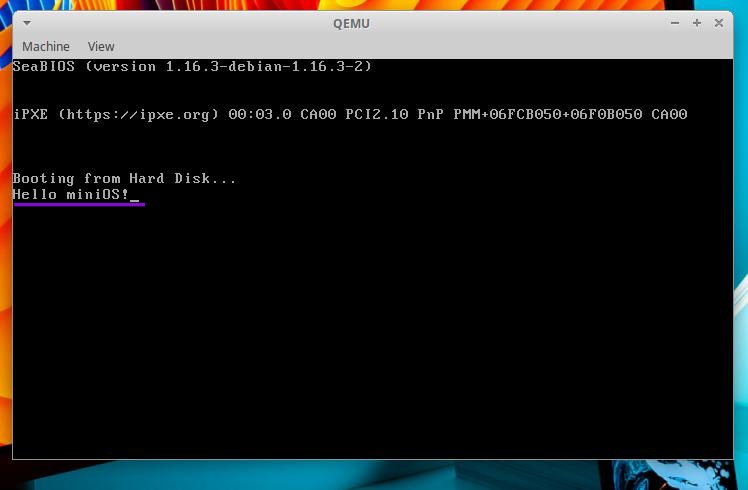
👉🏻 코드설명 / Code description
✔️ 레지스터 ax,ds를 0 으로 초기화하기
Initialize registers ax and ds to 0.
    mov ax, 0
    mov ds, ax
— 레지스터(Register)는 변수와 비슷하지만, CPU(컴퓨터의 두뇌) 내부에 존재하는 ‘초고속 미니 저장 공간’입니다.(RAM이 아님)
A register is similar to a variable, but it is a “high-speed mini-storage space” located inside the CPU (the brain of the computer)—not in RAM.
— ax와 ds를 0으로 초기화하는 이유는 다음과 같습니다.
The reasons for initializing ax and ds to zero are as follows.
1) ds에 쓰레기 값이 들어 있을 수 있어서 0으로 초기화 합니다. 쓰레기 값이 있으면 잘못된 주소를 가리킵니다.ds may contain garbage values, so it is initialized to zero; if garbage values are present, it would point to an invalid address.
2)주소 계산공식
Address calculation formula
세그먼트 레지스터(ds)가 0이기 때문에 변수의 데이터크기가 주소위치가 됩니다.
Since the segment register (ds) is 0, the data size of the variable becomes the address location.
진짜 주소 = (세그먼트 레지스터 × 16) + 변수의 위치(오프셋)
Actual address = (segment register × 16) + variable location (offset)
— 아래의 📓부분은 변수,레지스터에 대한 개념 및 용도 설명입니다.
The section marked 📓 below explains the concepts and purposes of variables and registers.
📓 변수와 레지스터의 핵심 차이점
Key differences between variables and registers
1)어셈블러에서 레지스터에 등록하는건 변수등록과 유사하지만 다음과 같은 차이점이 있습니다.
Registering a register in an assembler is similar to declaring a variable, but there are the following differences.
| 구분 (Category) | 변수 (Variable) | 레지스터 (Register) |
|---|---|---|
| 위치 / Location | 컴퓨터의 메모리(RAM) Computer memory (RAM) | CPU 내부 하드웨어 Internal CPU hardware |
| 개수 / Quantity | 메모리 용량이 허용하는 한 무한대 Infinite as long as memory capacity allows | CPU 설계 시 고정됨 (수십 개 내외) Fixed during CPU design (around a few dozen) |
| 이름 / Name | age, name 등 개발자가 마음대로 지음Age, name, etc. are named arbitrarily by the developer | ax, bx, cx, ds 등 이미 정해져 있음ax, bx, cx, ds, etc., are already defined. |
| 속도 / Speed | 빠름 / fast | 컴퓨터에서 가장 빠름 (메모리보다 수십 배) Fastest in the computer (dozens of times faster than memory) |
📓 레지스터의 종류 및 용도
Types and Uses of Registers
1-1) 일반 계산용 공간(범용 레지스터)
General-purpose calculation space (general-purpose registers)
AX (Accumulator - 누산기/연산용)
AX (Accumulator - for accumulation/calculation)

-- 수학 연산(더하기, 곱하기)의 중심이자, 입출력의 대리인입니다.
It is the hub of mathematical operations (addition, multiplication) and the agent for input and output.

-- 위 코드에서 mov ah, 0x0e를 할 때 사용한 ah, al이 바로 이 ax를 반씩 쪼개서 쓰는 이름입니다. BIOS 기능을 호출할 때 번호표 역할을 합니다.
In the code above, the `ah` and `al` used with `mov ah, 0x0e` are the names for the two halves of the `ax` register; they serve as function identifiers when calling BIOS services.

BX (Base - 기준 주소용)
BX (Base - for base address)

-- 메모리의 특정 주소(위치)를 가리키는 나침반 역할을 자주 합니다.
It often acts as a compass pointing to a specific memory address (or location).

CX (Counter - 반복 횟수용)
CX (Counter - for repetition count)

-- or문 같은 반복문(Loop)이 몇 번 돌았는지 세는 계수기입니다. 루프 명령어를 쓰면 CPU가 자동으로 cx 값을 1씩 깎으면서 0이 될 때까지 반복합니다.
It is a counter that tracks the number of iterations for loops, such as the `loop` instruction. When the `loop` instruction is used, the CPU automatically decrements the `CX` register by 1 in each iteration until it reaches zero.

DX (Data - 데이터 확장용)
DX (Data - for data expansion)

-- ax만으로 담기 힘든 너무 큰 숫자를 곱하거나 나눌 때 서브 주머니로 돕거나, 하드웨어 장치와 소통할 때 씁니다.
It is used to assist with multiplication or division involving numbers too large to fit into the `ax` register alone—acting as a secondary storage—or when communicating with hardware devices.
1-2) 메모리 구역 관리용 공간 (세그먼트 레지스터)
Space for memory area management (segment registers)
DS는 위 구역들과 종류가 아예 다른 세그먼트(Segment) 레지스터입니다. 16비트 컴퓨터는 메모리가 너무 넓어서, 메모리를 여러 구역으로 나누어 관리합니다.
The DS is a segment register that belongs to a completely different category than the aforementioned areas. Because the memory space in 16-bit computers is so vast, memory is managed by dividing it into multiple sections.
DS (Data Segment) - 데이터를 찾기위한 인덱스스티커 / Index stickers for locating data

-- "지금부터 사용하는 변수나 문자열 같은 데이터는 모두 이 여기에서 찾으라"고 기준점을 잡는 역할을 합니다.
It serves as a reference point, indicating, "Look here for any data—such as variables or strings—that will be used from this point forward."

-- mov ds, ax로 데이터 동네 기준점을 0으로 잡았기 때문에, CPU가 msg 문자열의 정확한 위치를 찾아낼 수 있었던 것입니다.
By setting the data segment base address to 0 with the instruction `mov ds, ax`, the CPU was able to locate the exact position of the `msg` string.

CS (Code Segment):
내가 실행할 진짜 명령어(코드)들이 모여 있는 주소입니다.
This is the address where the actual commands (code) I am to execute are located.

SS (Stack Segment):
함수를 호출하거나 임시 데이터를 잠시 쌓아두는 '스택'이라는 임시 저장 공간의 주소입니다.
It is the address of a temporary storage space called the "stack," used for calling functions or briefly storing temporary data.
✔️ 출력할 문자열 'Hello miniOS!', 0이 저장된 메모리의 시작 주소를 SI 레지스터에 넣습니다.
Load the starting address of the memory containing the string ‘Hello miniOS!’ and the value 0 into the SI register.
mov si, msg— msg는 코드 윗부분에서 초기화 한부분이 없지만 아래에 ‘msg db ‘Hello miniOS!’, 0’이 코드를 보고 si 레지스터에 자동으로 주소를 등록합니다.
Although msg is not explicitly initialized in the upper section of the code, the address is automatically registered in the SI register based on the line msg db 'Hello miniOS!', 0 found further down.
— si 레지스터를 사용하는 이유는 바로 아래에 lodsb(Load String Byte) 코드 때문입니다.
The reason the SI register is used is because of the lodsb (Load String Byte) instruction immediately following it.
— lodsb(Load String Byte) 명령어는 CPU 내부에 다음과 같이 강제로 약속이 되어 있습니다.
The lodsb (Load String Byte) instruction is hard-wired within the CPU to operate according to the following conventions:
"lodsb 명령어가 실행되면, CPU는 무조건 si 레지스터가 가리키고 있는 메모리 주소로 찾아가서 1바이트를 읽어 AL 레지스터에 넣는다."

When the `lodsb` instruction is executed, the CPU unconditionally accesses the memory address pointed to by the `SI` register, reads one byte, and loads it into the `AL` register.
— 그래서 lodsb와 si레지스터는 같이 사용합니다.
Therefore, the lodsb instruction and the si register are used together.
— 어셈블러에서는 컴파일되기전 컴파일러가 전체 코드를 모두 살펴보고 계산한 후 컴파일됩니다.
In the case of an assembler, the compiler examines and calculates the entire code before the actual compilation takes place.
✔️ 텔레타이프 모드(한글자 출력 기능)
Teletype mode (character-by-character output function)
— 화면에 타자기처럼 출력하라는 명령입니다.
This is a command to output text to the screen like a typewriter.
— 텔레타이프 모드를 선택하면 커서 자동이동 자동줄바꿈 기능을 지원합니다.
Selecting Teletype mode enables automatic cursor movement and automatic line wrapping.
— al 레지스터 내의 문자 출력 기능인 int 0x10와 같이 사용합니다.
It is used in conjunction with int 0x10, a function for outputting characters via the al register.
mov ah, 0x0e ✔️ 무한루프 이전 반복문에서 msg db ‘Hello miniOS!’, 0이 데이터 부분을 모두 참조하고 무한루프로 대기 합니다.
In the loop preceding the infinite loop, msg db 'Hello miniOS!', 0 references the entire data section, and the program then waits within the infinite loop.
jmp $✔️ 메모리 msg에 Hello miniOS!0 값을 입력합니다.
Enter the value “Hello miniOS!0” into the memory location msg.
— 0은 문자열의 끝임을 확인하기 위해서 입니다.
It is to verify that 0 marks the end of the string.
— 변수에 타입이 없는 이유는 모두 ascii값으로 저장되기 때문입니다.
The reason variables do not have types is that they are all stored as ASCII values.
msg db 'Hello miniOS!', 0✔️ 사용하지 않는 나머지 공간을 모두 0으로 채웁니다.
Fill all remaining unused space with zeros.
— times는 변수가 아니라 반복명령지시어 입니다.
‘times’ is not a variable; it is a command for repetition.
times 510 - ($ - $$) db 0✔️ 부팅가능함을 지시하는 코드입니다.
This is the code that indicates bootability.
dw 0xaa55👋 결론 / conclusion
✔️16비트 컴퓨터에서 화면에 글자를 표시하기 위해서는 msg변수에 문자를 입력해놓고 한글자씩 al레지스터에서 가져와서 화면에 출력합니다.
To display characters on the screen of a 16-bit computer, the characters are stored in the msg variable, then retrieved one by one from the AL register and output to the screen.
✔️ al레지스터에서 한글자씩 문자를 가져오는 기능을 반복하기 위해서 si 레지스터와 lodsb를 사용합니다.
To repeatedly fetch characters one by one from the register, the SI register and the lodsb instruction are used.