👉🏻 기존의 markdown파일에 글을 저장하는 부분을 SQLite로바꿨습니다.
I replaced the part that saves text to existing Markdown files with SQLite.
👉🏻 이전 포스트 / Previous post
📁 전체 디렉토리 구조 / Overall directory structure
myapp6/
├── app/
│   ├── api/
│   │   └── guestbookapp/
│   │       └── route.js
│   ├── guestbookapp/
│   │   └── page.tsx
│   ├── favicon.ico
│   ├── globals.css
│   ├── layout.tsx
│   └── page.tsx
│
└── local.db (SQLite3 DB)
📁 프로젝트 설치 / Project Installation
npx create-next-app@latest📁 SQLite3 설치 / Installing SQLite3
npm install better-sqlite3📁 코드 설명 / Code Description
✔️ 이전 부분에서 바뀐건 백엔드 route.js입니다.
The change from the previous section is in the backend route.js.
✔️ page.tsx파일은 제목만 바뀌었습니다.
Only the title has been changed in the page.tsx file.
✔️ 글을 저장하고 읽어 오는 로직이md파일에서 sqlite데이터베이스로 바뀌었습니다.
The logic for saving and retrieving posts has been changed from using Markdown files to an SQLite database.
✔️ route.js
— sqlite3 모듈 설정 / Configuring the sqlite3 module
import Database from 'better-sqlite3';— 데이터베이스가 없다면 생성합니다.
If the database does not exist, create it.
const dbPath = path.join(process.cwd(), 'local.db');
const db = new Database(dbPath);

// 서버 시작 시 posts 테이블이 없으면 생성합니다.
// Create the posts table if it doesn't exist when the server starts.
db.exec(`
  CREATE TABLE IF NOT EXISTS posts (
    id INTEGER PRIMARY KEY AUTOINCREMENT,
    slug TEXT UNIQUE NOT NULL,
    title TEXT NOT NULL,
    content TEXT NOT NULL,
    created_at DATETIME DEFAULT CURRENT_TIMESTAMP
  )
`);
— 데이터가 없으면 초기데이터를 입력 합니다.
If there is no data, enter the initial data.
const checkEmpty = db.prepare('SELECT COUNT(*) as count FROM posts').get();

if (checkEmpty.count === 0) {
  const insertInitial = db.prepare('INSERT INTO posts (slug, title, content) VALUES (?, ?, ?)');

  const defaultTitle = '반갑습니다! 첫 방문을 환영합니다.';
  const defaultSlug = 'welcome-to-my-blog';
  const defaultContent = `안녕하세요! 블로그 시스템이 성공적으로 구축되었습니다.
  \n\n이 글은 데이터베이스가 비어 있을 때 자동으로 생성되는 첫 안내글입니다. 자유롭게 새 글을 작성하여 블로그를 채워보세요!
  \n\nHello! The blog system has been successfully set up.
  \n\nThis post is the first greeting that is automatically created when the database is empty. Feel free to write new posts and fill your blog!
  `;

  insertInitial.run(defaultSlug, defaultTitle, defaultContent);
  console.log(' 초기 인사말 데이터가 성공적으로 생성되었습니다. / Initial greeting data has been successfully created.');
}
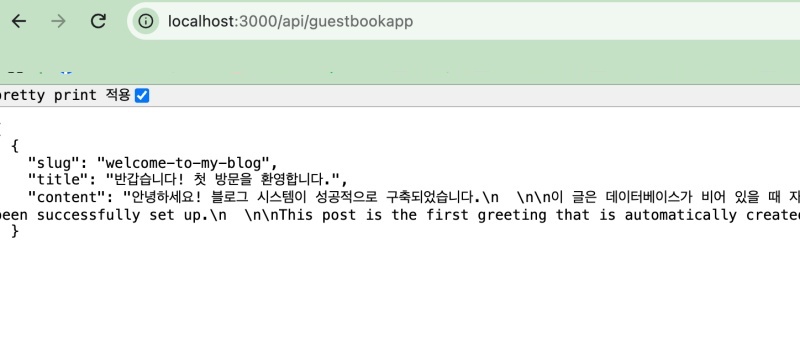
— 데이터베이스에서 데이터를 검색해서 json으로 응답합니다.(GET요청 처리)
Retrieves data from the database and responds with JSON (handles GET requests).
export async function GET() {
  try {
    // 최신 등록 순서(created_at 내림차순)로 데이터를 가져옵니다.
    // Fetch data in the order of latest registration (descending order of created_at)
    const stmt = db.prepare('SELECT slug, title, content FROM posts ORDER BY created_at DESC');
    const posts = stmt.all();

    return NextResponse.json(posts);
  } catch (error) {
    console.error("SQLite 조회 오류 / SQLite read error:", error);
    return NextResponse.json(
      { message: "데이터를 읽어오지 못했습니다. / Failed to read data." },
      { status: 500 }
    );
  }
}
— 데이터 베이스에 글을 입력합니다.(POST 요청 처리)
Inserts the post into the database (handling the POST request).
— 글 저장 성공시 status:201을 리턴합니다.
Returns status: 201 upon successful post saving.
/ Handle POST request (data registration)
export async function POST(request) {
  try {
    const body = await request.json();
    const { title, content } = body;

    if (!title || !content) {
      return NextResponse.json(
        { message: '제목과 내용을 모두 입력해주세요. / Please enter both title and content.' },
        { status: 400 }
      );
    }

    // slug 만들기 - 공백을 하이픈으로 대체하고 특수문자 제거
    // Create slug - replace spaces with hyphens and remove special characters
    const slug = title
      .trim()
      .replace(/\s+/g, '-')
      .replace(/[^a-zA-Z0-9가-힣\-]/g, '');

    // 중복된 slug(제목)가 있는지 확인
    // Check for duplicate slug (title)
    const checkStmt = db.prepare('SELECT id FROM posts WHERE slug = ?');
    const existingPost = checkStmt.get(slug);

    if (existingPost) {
      return NextResponse.json(
        { message: '이미 동일한 제목의 글이 존재합니다. / A post with the same title already exists.' },
        { status: 409 }
      );
    }

    // 데이터베이스에 새 게시글 삽입
    // Insert new post into the database
    const insertStmt = db.prepare('INSERT INTO posts (slug, title, content) VALUES (?, ?, ?)');
    insertStmt.run(slug, title, content);

    // 성공 시 반환할 데이터 객체
    // Data object to return on success
    const newPost = { slug, title, content };

    return NextResponse.json(newPost, { status: 201 });

  } catch (error) {
    console.error("SQLite 저장 오류 / SQLite write error:", error);
    return NextResponse.json(
      { message: '서버에 데이터를 저장하지 못했습니다. / Failed to save data.' },
      { status: 500 }
    );
  }
}
📁 서버 실행 / Start Server
npm run dev📁 API테스트 / API Test
— http://localhost:3000/api/guestbookapp
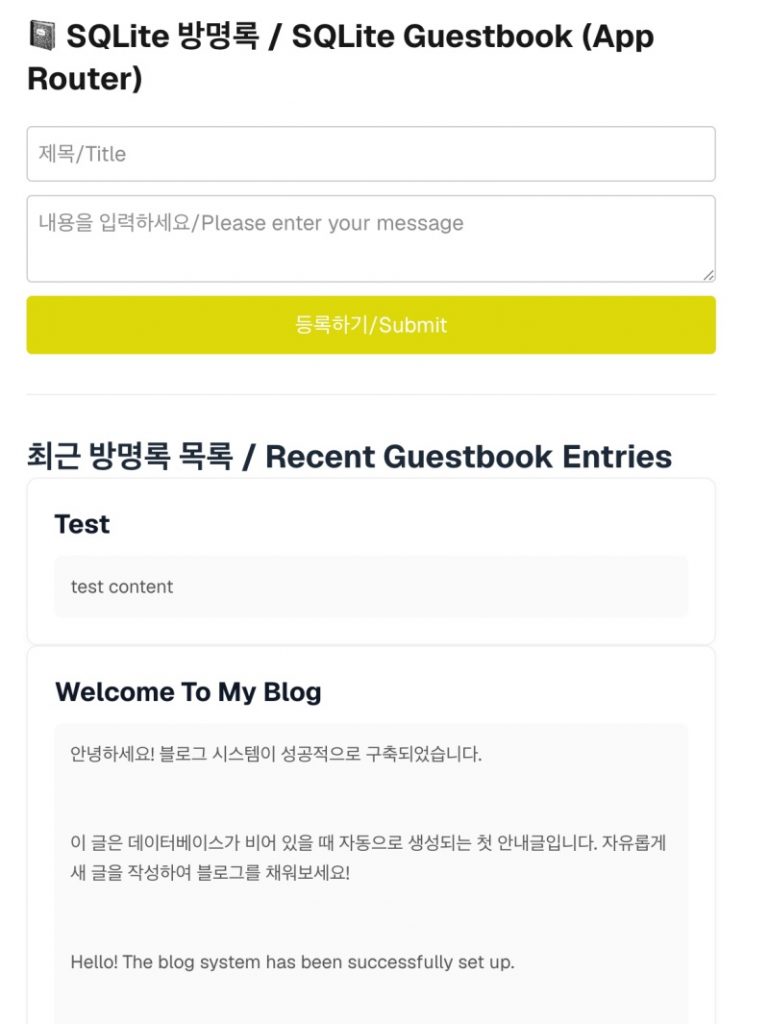
📁 글 입력 테스트 / Text input test
— http://localhost:3000/guestbookapp
📁SQLite CLI
✔️ 데이터베이스 연결 / Database Connection
— 프로젝트 로컬에 만들어진 local.db파일을 열떄 사용합니다.
This is used to open the local.db file created in the project’s local directory.
myapp6 % sqlite3 local.db
SQLite version 3.51.0 2000-10-10 10:10:10
Enter ".help" for usage hints.
sqlite>
✔️ 전체 테이블 보기
View full table
sqlite> .tables
posts
✔️ 테이블 구조 보기
View table structure
sqlite> .schema posts
CREATE TABLE posts (
    id INTEGER PRIMARY KEY AUTOINCREMENT,
    slug TEXT UNIQUE NOT NULL,
    title TEXT NOT NULL,
    content TEXT NOT NULL,
    created_at DATETIME DEFAULT CURRENT_TIMESTAMP
  );
sqlite> pragma table_info(posts);
0|id|INTEGER|0||1
1|slug|TEXT|1||0
2|title|TEXT|1||0
3|content|TEXT|1||0
4|created_at|DATETIME|0|CURRENT_TIMESTAMP|0- cid: 컬럼 순번 (0, 1, 2…) / Column index (0, 1, 2…)- name: 컬럼 이름 / Column name- type: 데이터 타입 (TEXT, INTEGER 등) / Data types (TEXT, INTEGER, etc.)- notnull: NOT NULL 여부 (1이면 필수 입력) / NOT NULL status (1 indicates a required field)- dflt_value: 기본값 / Default value- pk: 기본키 여부 (1이면 PK) / Primary key status (1 if PK)
✔️ 데이터 베이스 검색 / Database Search
sqlite> select id,title from posts;
1|반갑습니다! 첫 방문을 환영합니다.
2|test
sqlite>


